Wallet Security
Setting Up A Wallet Safely
Setting up a wallet safely means verifying the app source, understanding whether the wallet is custodial or self-custodial, and making careful decisions about devices, backups, and recovery from the start. It helps readers connect choose the right wallet type and verify the download source while keeping the core tradeoffs and risks in view. The safest habit is to treat the download step as a security step, not a convenience step.
TL;DR
Start with the basics of choosing a wallet, checking the right download path, and setting up a wallet without introducing obvious security holes on day one. It clarifies choose the right wallet type, verify the download source, and secure the device first so the lesson fits into the bigger wallet security picture.
Choose the right wallet type
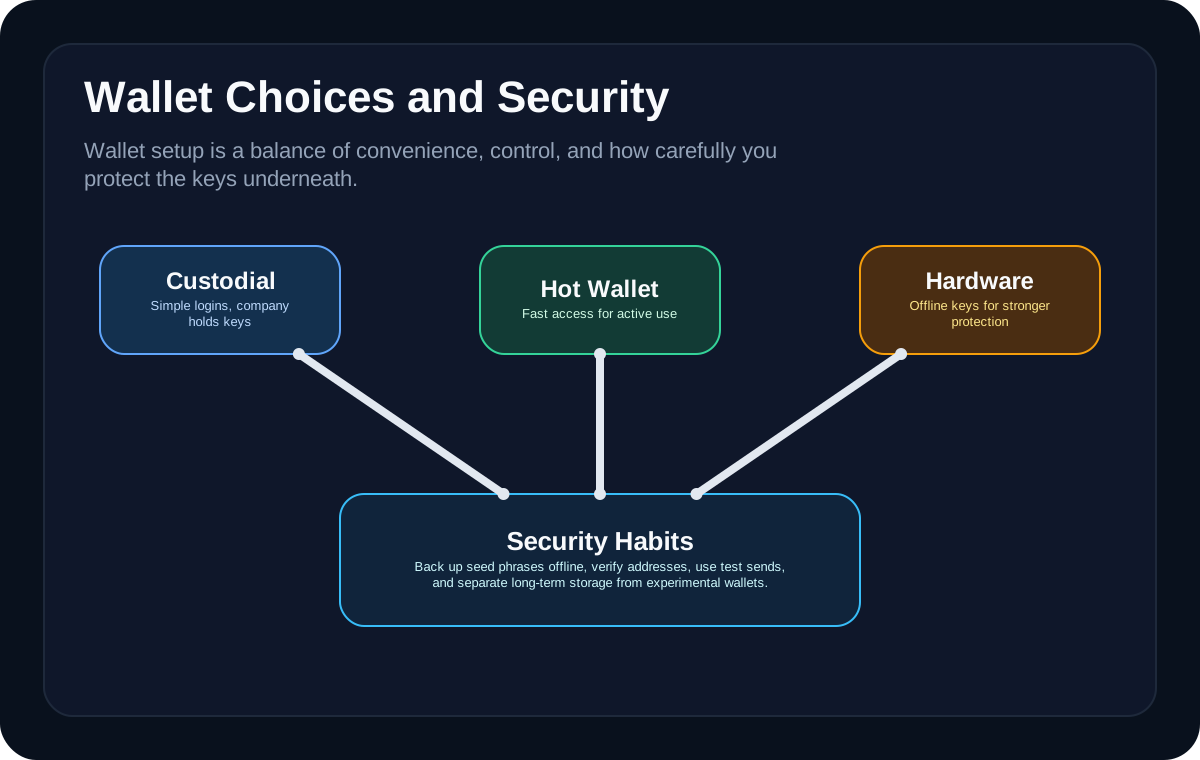
The safest wallet is not automatically the most advanced one. Beginners should first decide whether they need a mobile wallet, browser wallet, hardware wallet, or a custodial option for simpler onboarding. The right choice depends on how much value is involved and how often the wallet will be used.
**Setting Up A Wallet Safely** becomes easier to understand when you translate it into a user flow instead of a definition. In practice, learners usually meet this idea while *writing recovery material offline and checking it twice*, then discover that the visible app action sits on top of wallet permissions, network rules, liquidity, or settlement assumptions that are easy to miss the first time. That is why the safest beginner habit is to ask how the action works, what the hidden dependency is, and what part of the system would fail first under stress.
A common beginner mistake here is *storing recovery phrases in cloud notes or screenshots*. Another is *clicking a wallet link from a fake support message*. Those errors usually do not come from bad intent; they come from skipping one layer of understanding and moving straight to the transaction. What can go wrong depends on the lesson, but the pattern is consistent: users either trust the wrong tool, underestimate timing and fees, or assume one network's rules apply everywhere. Slowing down long enough to verify the route, asset, counterparty, or contract address prevents a surprising share of early losses.
A useful way to test whether this idea is landing is to picture where it shows up in a real workflow. Someone might run into it while *writing recovery material offline and checking it twice* or *reviewing a wallet approval before signing it*, which is why the topic matters most once money, permissions, or liquidity are already in motion instead of while reading definitions in the abstract.
**Why this matters:** Setting Up A Wallet Safely is more useful when you can connect it to Crypto Wallets, Crypto Security, and Buying Your First Crypto. That broader map helps beginners judge when the tool fits, when a simpler path is safer, and which follow-on topic to study next before committing real money or signing real transactions.
For primary-source context, see [Ethereum wallets guide](https://ethereum.org/en/wallets), [Ethereum security report](https://ethereum.org/reports/trillion-dollar-security.pdf), and [Ethereum smart contracts docs](https://ethereum.org/developers/docs/smart-contracts/).
Verify the download source
A fake wallet download can compromise everything before you even receive your first funds. That is why official website links, app-store listings, and verified documentation matter so much during setup. The safest habit is to treat the download step as a security step, not a convenience step.
The real value of **verify the download source** is that it explains what is happening behind the button a beginner clicks. Whether someone is *reviewing a wallet approval before signing it* or *keeping higher-value storage separate from a daily-use hot wallet*, the outcome depends on a chain of infrastructure choices such as custody, routing, execution, and final settlement. Once that chain is clear, the topic stops feeling like crypto magic and starts feeling like a system with understandable moving parts.
Most people do not get hurt by the concept itself. They get hurt by the shortcuts they take around it. *Clicking a wallet link from a fake support message* can turn a simple workflow into an expensive mistake, and *treating a hardware wallet like a complete substitute for good habits* often becomes visible only after funds are already in motion. That is why good crypto education pairs the mechanics with practical failure modes instead of teaching the upside in isolation.
Beginners usually retain this faster when they attach it to a concrete decision rather than a glossary term. In practice, the concept becomes easier to trust and easier to question once you connect it to a workflow like *reviewing a wallet approval before signing it* and ask what could break, slow down, or become expensive at each step.
**Why this matters:** Setting Up A Wallet Safely is more useful when you can connect it to Crypto Wallets, Crypto Security, and Buying Your First Crypto. That broader map helps beginners judge when the tool fits, when a simpler path is safer, and which follow-on topic to study next before committing real money or signing real transactions.
Secure the device first
Wallet safety starts with the device the wallet lives on. A compromised laptop or phone can undermine even a well-designed wallet, so software updates, screen locks, and basic device hygiene matter more than many beginners expect.
**Setting Up A Wallet Safely** becomes easier to understand when you translate it into a user flow instead of a definition. In practice, learners usually meet this idea while *keeping higher-value storage separate from a daily-use hot wallet*, then discover that the visible app action sits on top of wallet permissions, network rules, liquidity, or settlement assumptions that are easy to miss the first time. That is why the safest beginner habit is to ask how the action works, what the hidden dependency is, and what part of the system would fail first under stress.
Most people do not get hurt by the concept itself. They get hurt by the shortcuts they take around it. *Treating a hardware wallet like a complete substitute for good habits* can turn a simple workflow into an expensive mistake, and *storing recovery phrases in cloud notes or screenshots* often becomes visible only after funds are already in motion. That is why good crypto education pairs the mechanics with practical failure modes instead of teaching the upside in isolation.
A useful way to test whether this idea is landing is to picture where it shows up in a real workflow. Someone might run into it while *keeping higher-value storage separate from a daily-use hot wallet* or *writing recovery material offline and checking it twice*, which is why the topic matters most once money, permissions, or liquidity are already in motion instead of while reading definitions in the abstract.
**Why this matters:** Setting Up A Wallet Safely is more useful when you can connect it to Crypto Wallets, Crypto Security, and Buying Your First Crypto. That broader map helps beginners judge when the tool fits, when a simpler path is safer, and which follow-on topic to study next before committing real money or signing real transactions.
Understand what the wallet controls
A wallet does not hold coins the way a leather wallet holds cash. It controls the keys and permissions that let you access assets recorded on a blockchain. That mental model matters because it changes how you think about backup, recovery, and loss.
The real value of **understand what the wallet controls** is that it explains what is happening behind the button a beginner clicks. Whether someone is *writing recovery material offline and checking it twice* or *reviewing a wallet approval before signing it*, the outcome depends on a chain of infrastructure choices such as custody, routing, execution, and final settlement. Once that chain is clear, the topic stops feeling like crypto magic and starts feeling like a system with understandable moving parts.
A common beginner mistake here is *storing recovery phrases in cloud notes or screenshots*. Another is *clicking a wallet link from a fake support message*. Those errors usually do not come from bad intent; they come from skipping one layer of understanding and moving straight to the transaction. What can go wrong depends on the lesson, but the pattern is consistent: users either trust the wrong tool, underestimate timing and fees, or assume one network's rules apply everywhere. Slowing down long enough to verify the route, asset, counterparty, or contract address prevents a surprising share of early losses.
Beginners usually retain this faster when they attach it to a concrete decision rather than a glossary term. In practice, the concept becomes easier to trust and easier to question once you connect it to a workflow like *writing recovery material offline and checking it twice* and ask what could break, slow down, or become expensive at each step.
**Why this matters:** Setting Up A Wallet Safely is more useful when you can connect it to Crypto Wallets, Crypto Security, and Buying Your First Crypto. That broader map helps beginners judge when the tool fits, when a simpler path is safer, and which follow-on topic to study next before committing real money or signing real transactions.
First-day wallet checklist
A strong first-day setup is mostly about reducing avoidable errors. The best beginners slow down, double-check the source, write down recovery material carefully, and test the wallet with a smaller amount before treating it as a long-term home for bigger balances.
**Setting Up A Wallet Safely** becomes easier to understand when you translate it into a user flow instead of a definition. In practice, learners usually meet this idea while *reviewing a wallet approval before signing it*, then discover that the visible app action sits on top of wallet permissions, network rules, liquidity, or settlement assumptions that are easy to miss the first time. That is why the safest beginner habit is to ask how the action works, what the hidden dependency is, and what part of the system would fail first under stress.
Most people do not get hurt by the concept itself. They get hurt by the shortcuts they take around it. *Clicking a wallet link from a fake support message* can turn a simple workflow into an expensive mistake, and *treating a hardware wallet like a complete substitute for good habits* often becomes visible only after funds are already in motion. That is why good crypto education pairs the mechanics with practical failure modes instead of teaching the upside in isolation.
A useful way to test whether this idea is landing is to picture where it shows up in a real workflow. Someone might run into it while *reviewing a wallet approval before signing it* or *keeping higher-value storage separate from a daily-use hot wallet*, which is why the topic matters most once money, permissions, or liquidity are already in motion instead of while reading definitions in the abstract.
**Why this matters:** Setting Up A Wallet Safely is more useful when you can connect it to Crypto Wallets, Crypto Security, and Buying Your First Crypto. That broader map helps beginners judge when the tool fits, when a simpler path is safer, and which follow-on topic to study next before committing real money or signing real transactions.
- Download only from the official wallet source.
- Set a device lock and update the operating system first.
- Write down recovery material carefully and store it offline.
- Test the wallet with a smaller transaction before using it heavily.
Visual Guides
Glossary
- Self-custody
- Holding the keys or recovery material yourself rather than relying entirely on a third party.
- Custodial wallet
- A wallet or platform where a company controls access and key management on your behalf.
- Recovery phrase
- A seed phrase used to restore wallet access if the original device is lost.
- App verification
- The process of confirming you are downloading the real wallet app from the official source.
FAQ
What kind of wallet should a beginner start with?
Most beginners do well with a reputable mobile or browser wallet for smaller amounts, then graduate to a hardware wallet as balances and security needs grow.
Why is the download source such a big deal?
Because fake wallet apps and phishing pages are one of the easiest ways to steal funds before a user even understands what went wrong.
Can a good wallet protect me if my device is unsafe?
Only to a point. Wallet design matters, but a compromised device can still capture passwords, approvals, or recovery material.
Does a wallet actually store the coins?
Not in the physical sense. The assets remain on-chain, and the wallet controls the keys needed to access and move them.
Should I send a test transaction first?
Yes. Small test transactions are one of the simplest ways to catch setup and routing mistakes before more value is at risk.